Turn on Screen Sharing on your Mac and connect from iPad
Last updated: October 28, 2026 · By Jérémie Aouate
To control your Mac from an iPad, turn on Screen Sharing on the Mac, then connect with DualMac, a free VNC client for iPad and iPhone. The iPad and the Mac must be on the same network, or on the same Tailscale tailnet when you are away. DualMac signs in with the user name and password of your macOS account, and nothing has to be installed on the Mac.
What you need
- A Mac with Screen Sharing turned on in System Settings › General › Sharing.
- DualMac on an iPad with iPadOS 17.6 or later, or on an iPhone with iOS 17.6 or later. DualMac is free on the App Store and needs no account.
- The iPad and the Mac on the same Wi‑Fi network, or both signed in to the same Tailscale tailnet.
- The user name and password of a macOS account on that Mac: the ones you use to log in to it.
Turn on Screen Sharing on the Mac
- On the Mac, open System Settings from the Apple menu.
- Click General in the sidebar, then Sharing.
- Turn on Screen Sharing.
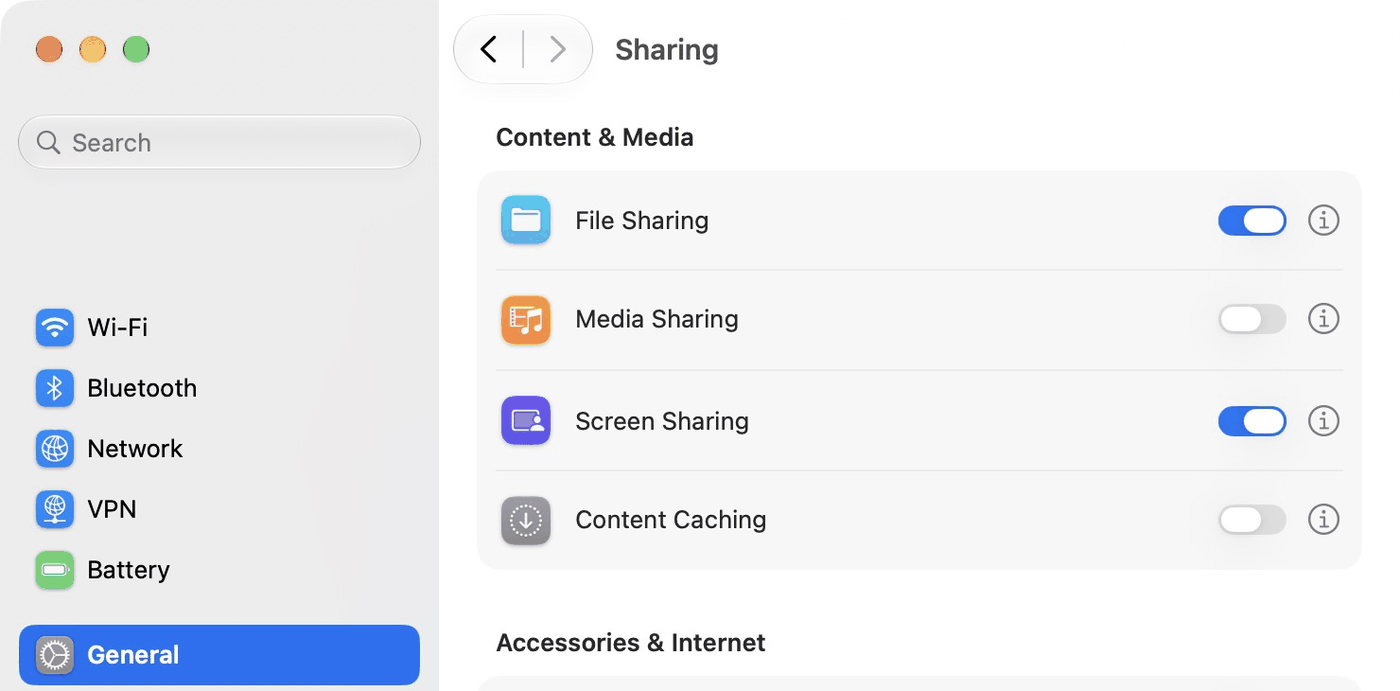
The path is the same on macOS 13 Ventura, macOS 14 Sonoma, macOS 15 Sequoia, macOS 26 Tahoe and macOS 27. On macOS 12 Monterey and earlier, open System Preferences › Sharing and tick Screen Sharing.
Remote Management, listed under Advanced in the same pane, includes Screen Sharing and replaces it when it is on. With Remote Management on, DualMac should connect the same way, and the accounts allowed to connect are set in the Remote Management options, not in Screen Sharing › Allow access for.
Choose who can connect
Click the info button (ⓘ) next to Screen Sharing to open its options.
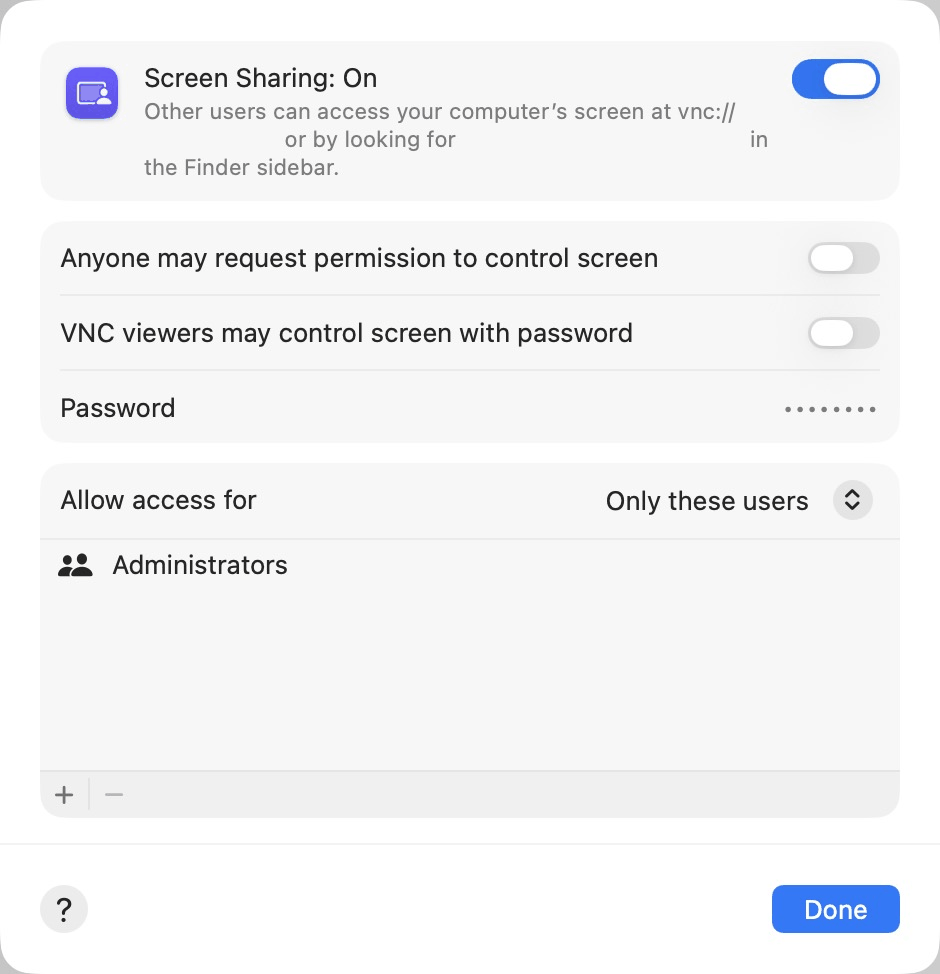
- Allow access for: with All users, every user account of the Mac can connect. With Only these users, only the users and groups in the list can connect: make sure your account is in it, or add it with the + button.
- VNC viewers may control screen with password sets a separate VNC password for other VNC apps. DualMac doesn't need it: it signs in with your macOS account, so you can leave this option off.
- Leave the other options as they are, then click Done.
Find the Mac's address
On the same Wi‑Fi, you usually don't need an address: DualMac shows the Macs that have Screen Sharing on, and your Mac appears in the library by itself, often within seconds. To type an address instead, use one of these:
- Local hostname: at the bottom of System Settings ›
General › Sharing, the Mac's name on your network, ending in
.local. - IP address: the Screen Sharing options show it after
vnc://, for examplevnc://192.168.1.20/. - Tailscale address: the 100.x address in the
Tailscale menu on the Mac, or the Mac's MagicDNS name, ending in
.ts.net.

Connect from iPad with DualMac
- Open DualMac on the iPad. If your Mac appears in the library, tap Connect on its card and go to step 4.
- Otherwise, tap + at the top of the library (⌘N on a hardware keyboard), or Add by address when the library is empty.
- In Add a Mac, type the Mac's address in
Address: its
.localname, its IP address, itsvnc://address or its Tailscale address. Then tap Connect. DualMac fills in the name and the port, 5900, the Screen Sharing port, which you can change under Advanced options. - When DualMac asks you to sign in with the account you use on this Mac, type your macOS username and Password, then tap Connect. With Remember on this iPad on, they are stored in the iPad's Keychain, protected by Face ID or Touch ID.
On iPhone, the steps are the same.
If it doesn't work
The Mac refuses my password
This is the most common error: the Mac expects the user name and password of a macOS account, the ones you type to log in to that Mac. That is the password of your user account on that Mac, not your Apple Account password (unless you use the same one). The VNC password set under “VNC viewers may control screen with password” doesn't work in this sign-in. Also check that this account is allowed under Screen Sharing › Allow access for, with All users or with the account in the list. After a second refusal, DualMac reminds you which password the Mac expects.
If DualMac shows only a Password field, without a macOS username field, the Mac is asking for a VNC password instead: type the one set under “VNC viewers may control screen with password”.
DualMac can't find my Mac
- Check that Screen Sharing is on and that the iPad and the Mac are on the same Wi‑Fi. Guest networks and hotel Wi‑Fi usually block this: add the Mac by its address instead.
- DualMac needs Local Network access, which iPadOS asks for at first launch. If you said no: Settings › Apps › DualMac › Local Network (iPadOS 17: Settings › DualMac).
- A Mac that is asleep or has its lid closed doesn't answer: wake it first.
- If the macOS firewall is set to “Block all incoming connections”, it blocks Screen Sharing too. The option is in System Settings › Network › Firewall › Options.
The screen is black or locked
DualMac shows what the Mac's screen shows. On the lock screen or the login window, type your macOS password with the keyboard, as you would at the Mac. With the Companion paired, DualMac also says when the Mac is locked and can type a password you saved for that Mac. If the screen stays black, disconnect and connect again.
My Mac is asleep or turned off
Screen Sharing can't answer while the Mac is asleep, has its lid closed or is turned off. The free DualMac Companion adds wake controls for a Mac that sleeps. DualMac also has Wake-on-LAN built in: in Add a Mac, under Advanced options › Network wake, turn on Configure Wake-on-LAN and type the Mac's MAC address. A sent packet does not confirm that the Mac woke up. A Mac that is turned off has to be started at the Mac.
I'm away from home
Install Tailscale on the iPad and on the Mac, sign in to the same tailnet on both, and add the Mac with its Tailscale address (100.x…) or its MagicDNS name. DualMac can also connect through an SSH tunnel, under Advanced options › SSH tunnel. Never open port 5900 to the internet, for example with port forwarding on your router: DualMac refuses to open VNC to a public internet address and has no relay server. The details are in the network facts.
More help
- Setup help and other questions: DualMac support.
- Price, requirements, network and privacy: DualMac facts.
- H.264 streaming, clipboard, files, wake and display selection: DualMac Companion for Mac.
- Still stuck? Write to [email protected] with your iPadOS and macOS versions.