Screen Sharing connects, but the Mac's screen is black or frozen
Last updated: November 24, 2026 · By Jérémie Aouate
Short answer
A VNC client shows what the Mac's screen shows. If the picture is black, the Mac's display may be off, or the Mac may be waiting on its lock screen or login window: move the pointer or press a key to wake it, then type your macOS password. If the picture is frozen or stays black, disconnect and connect again; in DualMac, Reconnect is in the session's ⋯ menu.
This page covers macOS Screen Sharing with any VNC client. The labels and messages quoted are those of DualMac, the VNC client for iPad and iPhone used here. If the Mac doesn't answer at all, see DualMac can't find my Mac instead.
The Mac's display is off
A Mac turns its display off after some time without use. The delay is set on the Mac in System Settings › Lock Screen, with “Turn display off on power adapter when inactive” (and, on a Mac laptop, “Turn display off on battery when inactive”). While the Mac stays awake, Screen Sharing still answers, but the picture can stay black until the display wakes.
Wake it the way you would at the Mac: move the pointer, click, or press a key, from DualMac. If the Mac itself has gone to sleep, it no longer answers at all: see My Mac is locked, asleep or turned off.
The Mac is on its lock screen or login window
Once the display wakes, a locked Mac shows its lock screen, and a Mac that nobody is logged in to shows its login window. Type your macOS password with the keyboard, as you would at the Mac, then press Return.
DualMac can also type it for you. Save the password once in the Mac's settings: touch and hold the Mac's card, tap Edit, and fill in Password to enter on the Mac, which is protected by Face ID, Touch ID or your passcode. In a session, choose Enter password in the ⋯ menu; it is active only once a password is saved for this Mac.
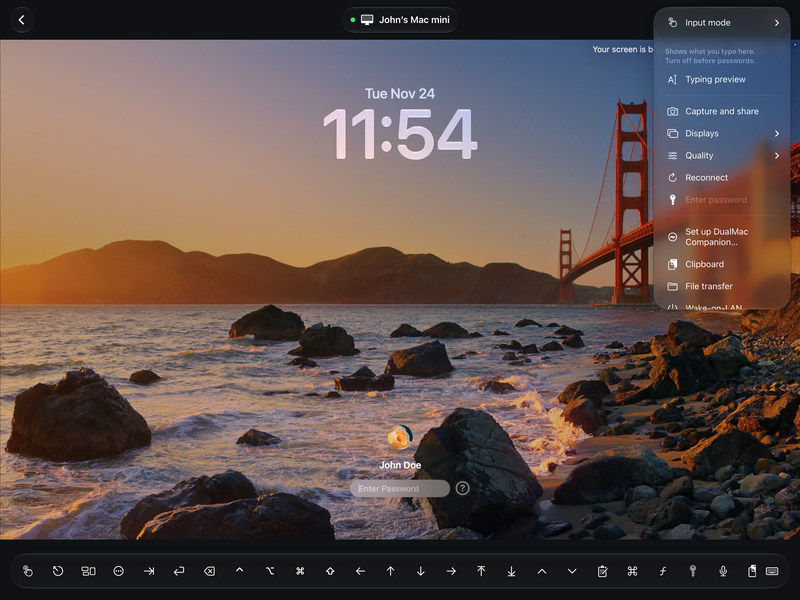
The picture is frozen
A frozen picture often points to the network between the iPad and the Mac. In DualMac:
- Open the ⋯ menu of the session and choose Reconnect.
- With Reconnect automatically on, under Connection in DualMac's Settings, DualMac reconnects by itself after a lost connection and shows “Reconnecting” with the attempt number.
- If DualMac says that the Mac “answered too slowly”, the message explains: “Screen Sharing answers on [address], but the session didn't open in time. The connection is probably too slow or unstable: try again, or use a faster network.”
The Mac closes the connection
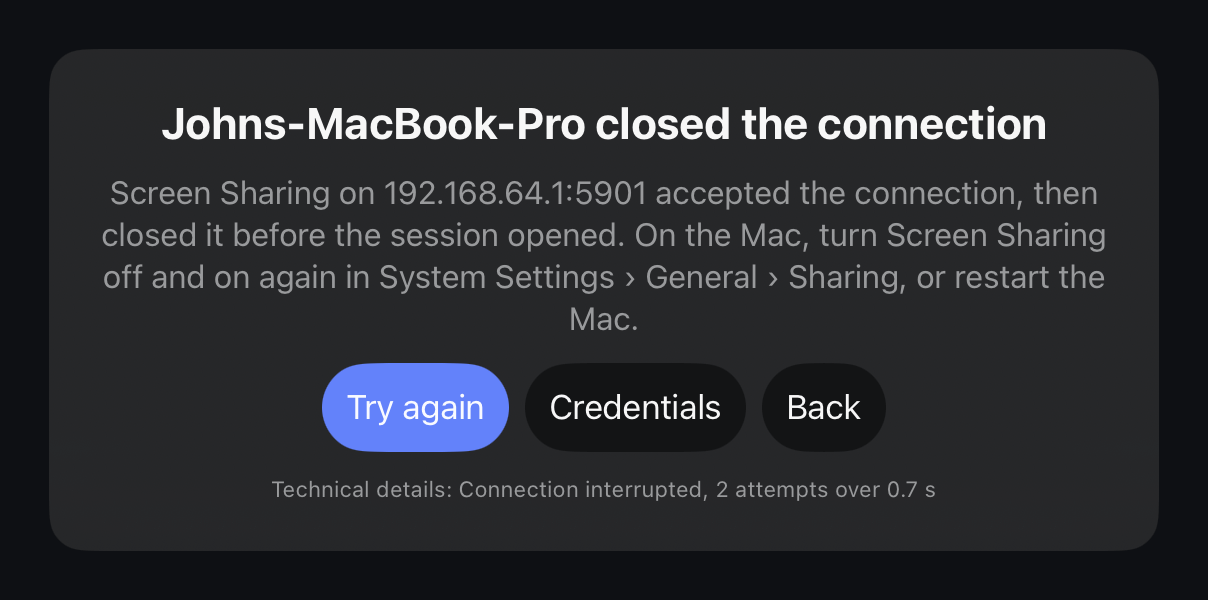
Sometimes Screen Sharing accepts the connection, then closes it before any picture arrives. DualMac then says that the Mac “closed the connection” and gives the fix: “On the Mac, turn Screen Sharing off and on again in System Settings › General › Sharing, or restart the Mac.”
The Mac asks which session to open
When you connect with an account that isn't the one open on the Mac's screen, the Mac can ask how to open the session. DualMac shows “The Mac is asking how to open its graphical session.” with the choices the Mac offers. Pick one to see a picture.
If DualMac shows Apple session refused or Apple session unavailable on an empty screen, edit the Mac (touch and hold its card, then Edit) and set Apple session to VNC compatibility, the default, then connect again.
The Mac has no monitor
A Mac with no display connected, such as a Mac mini used headless, can still be used with Screen Sharing, and DualMac suits that case. The steps above apply to it too. If the picture stays black after a reconnection, turn Screen Sharing off and on again on the Mac, or restart it.
Permissions on the Mac
macOS Screen Sharing needs no extra permission: turning it on in System Settings › General › Sharing is enough, and nothing has to be installed on the Mac. The optional DualMac Companion is different: it captures the screen itself, so it needs the Screen Recording permission on the Mac, which macOS asks to confirm again from time to time.
Still black?
- Disconnect, wait a few seconds and connect again.
- Check the Mac at the Mac if you can: is it awake, with its display on?
- To find the right page from the symptom, use Why can't I connect to my Mac?
- Write to [email protected] with your iPadOS or iOS version and your macOS version.
Questions
Why is the screen black when I connect to my Mac?
The Mac's display may be off, or the Mac may be waiting on its lock screen. Move the pointer or press a key to wake it, then type your macOS password.
Does Screen Sharing work when the Mac's display is off?
Yes, as long as the Mac itself is awake. A sleeping Mac doesn't answer at all.
Does the Mac need a monitor for Screen Sharing?
No. A headless Mac mini can be used with Screen Sharing, and DualMac suits that case.
Why does the picture freeze?
Often the network is too slow or unstable. Choose Reconnect in the session's ⋯ menu, or use a faster network.
Does Screen Sharing need Screen Recording permission?
No. Turning on Screen Sharing in System Settings › General › Sharing is enough, and nothing has to be installed on the Mac.
Sources
- Apple Support, Set sleep and wake settings for your Mac, Mac User Guide. Checked on November 24, 2026.
- Apple Support, Turn Mac screen sharing on or off, Mac User Guide. Checked on November 24, 2026.