VNC clients for iPad that connect to a Mac
Last updated: November 24, 2026 · By Jérémie Aouate
Short answer
A VNC client is an app that shows another computer's screen and sends it your taps and keystrokes. Every Mac has a VNC server built in: Screen Sharing, turned on in System Settings › General › Sharing. VNC clients for iPad on the US App Store include bVNC Pro, DualMac, Jump Desktop, Mocha VNC, RealVNC Viewer, Remoter VNC and Screens 5, priced from free to $29.99 to download.
What a VNC client is
VNC, Virtual Network Computing, is a standard way to view and control a computer over a network. The computer runs a VNC server; the device in your hands runs a VNC client. The client receives the screen and sends pointer and keyboard input back. Apple says Screen Sharing and Apple Remote Desktop are compatible with VNC.
What macOS Screen Sharing accepts
- Screen Sharing is turned on in System Settings › General › Sharing. Screen Sharing and Remote Management can't both be on at the same time.
- Allow access for sets which accounts of the Mac may connect: all users, or only the users in the list. A client signs in with the user name and password of one of these accounts.
- VNC viewers may control screen with password is an option that sets a separate password for VNC viewers. Apple asks you to enter that password when you turn the option on.
- Screen Sharing listens on port 5900. Never open that port to the internet: away from home, reach the Mac through Tailscale or an SSH tunnel.
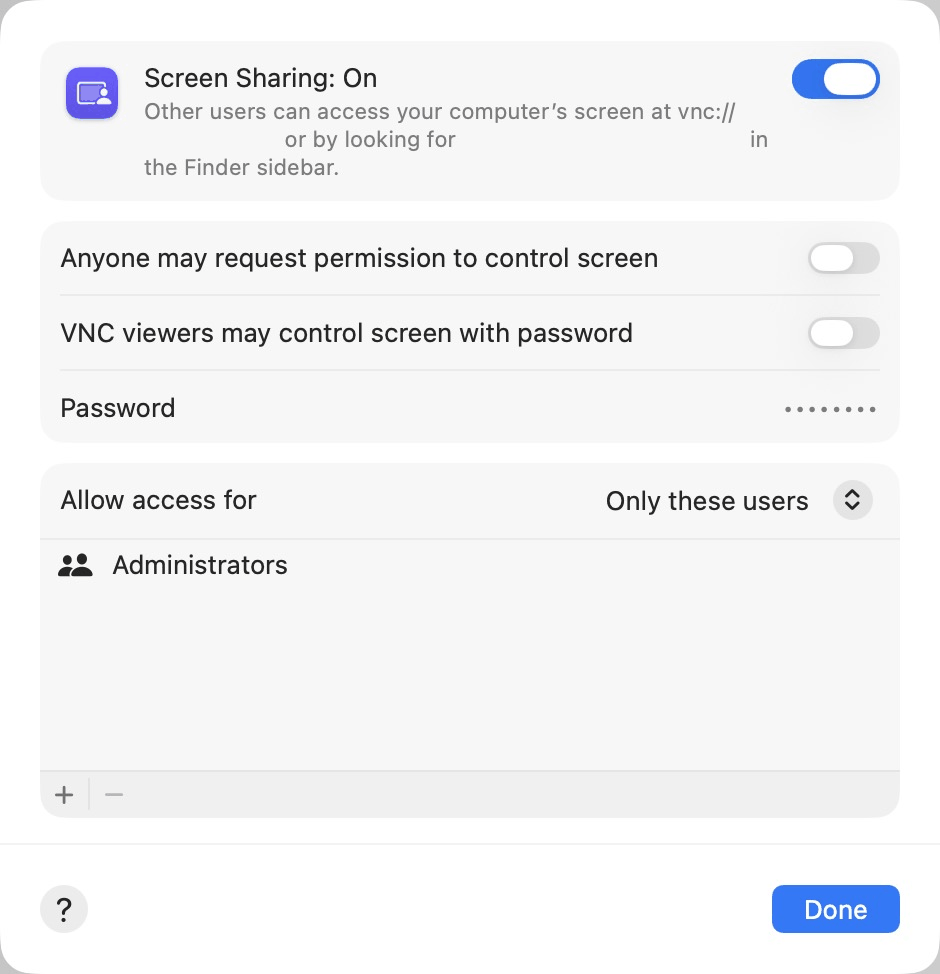
The step-by-step setup is in Turn on Screen Sharing on your Mac and connect from iPad.
VNC clients on the App Store
In alphabetical order, with no ranking. This page was written by the publisher of DualMac. Prices are those of the United States App Store, in US dollars, on November 24, 2026; each line comes from the app's listing or its publisher's pages, listed under Sources.
| App | Publisher | Price | Runs on |
|---|---|---|---|
| bVNC Pro | iordan iordanov | $9.99 | iPhone, iPad, Mac |
| DualMac | Marius Labs | Free download | iPad, iPhone |
| Jump Desktop | Phase Five Systems | $14.99 | iPhone, iPad |
| Mocha VNC | MochaSoft | $5.99; Mocha VNC Lite free | iPhone, iPad |
| RealVNC Viewer | RealVNC Limited | Free | iPhone, iPad |
| Remoter VNC | Remoter Labs LLC | $0.99 plus add-ons; Remoter Pro $29.99 | iPhone, iPad |
| Screens 5 | Edovia Inc. | Free; $4.99 a month, $29.99 a year or $249.99 lifetime | iPhone, iPad, Mac, Apple Vision Pro |
bVNC Pro
An open source VNC client under the GPL. Its listing names support for the Mac's built-in remote desktop server with Mac authentication, SSH tunneling, VeNCrypt, external keyboards, mice and the Magic Trackpad, and clipboard copy and paste from the device.
DualMac
A VNC client for iPad and iPhone that connects to macOS Screen Sharing and signs in with your macOS account. No account, no relay: local network, your Tailscale tailnet or an SSH tunnel. Its limits: Macs only, one Mac at a time, no audio. Clipboard and files need the optional DualMac Companion on the Mac.
Jump Desktop
Speaks RDP, VNC and Fluid, its own protocol. Its listing says its VNC mode was tested with Mac OS X, TightVNC, RealVNC, UltraVNC and Linux, supports SSH tunneling and SSL encryption, and can lock the Mac's screen and sync the pasteboard. The iPhone and iPad app is a one-time purchase.
Mocha VNC
Lists macOS sign-on with user id and password, Wake-on-LAN, printing and extra keys, and says it was tested with Apple's Screen Sharing. The free Mocha VNC Lite limits sessions to 5 minutes.
RealVNC Viewer
Its listing describes connecting through RealVNC's cloud service to Mac, Windows and Linux computers running RealVNC Connect, after signing in with a RealVNC account. RealVNC Connect is a subscription, with a 7-day trial; RealVNC's plan table lists connecting to third-party VNC servers among plan features.
Remoter VNC and Remoter Pro
Remoter VNC lists VNC protocol 3.8, compatibility with macOS Screen Sharing, network discovery, Wake-on-LAN, several connections at once and sending the device's clipboard to the computer. Add-ons are sold in the app, among them SSH ($7.99), RDP ($8.99) and Telnet ($8.99); the RemoterFusion add-on adds Mac audio. Remoter Pro, $29.99, includes VNC, RDP, SSH, Telnet and RemoterFusion.
Screens 5
Connects to Mac, Windows PC, Linux PC and Raspberry Pi. On an Apple silicon Mac with macOS 14 or later, its High Performance Screen Sharing adds remote audio and a desktop sized to the device. It reaches computers through your network, Screens Connect, Tailscale or SSH. Details in DualMac vs Screens 5.
Apps that don't use VNC, such as AnyDesk, Splashtop or TeamViewer, are in alternatives to Screens and Jump Desktop.
Questions
Does a Mac need extra software for a VNC client?
No. Screen Sharing, built into macOS, is a VNC server. Turn it on in System Settings › General › Sharing.
Which password does a VNC client use with a Mac?
The user name and password of a macOS account allowed under Allow access for. The separate VNC password exists only if you turn on “VNC viewers may control screen with password”.
Is there a free VNC client for iPad?
RealVNC Viewer and Screens 5 are free to download. RealVNC Viewer works with RealVNC Connect, a subscription sold on RealVNC's site; Screens 5 sells subscriptions and a lifetime purchase in the app. Mocha VNC Lite is free with 5-minute sessions. Prices are from the US App Store on November 24, 2026.
Can I use VNC away from home?
Yes, through Tailscale or an SSH tunnel. Never open port 5900 to the internet.
Sources
- Apple Support, Turn Mac screen sharing on or off, Mac User Guide. Checked on November 24, 2026.
- App Store listings, United States: “bVNC Pro - VNC Screen Sharing” (iordan iordanov), “Jump Desktop (RDP, VNC, Fluid)” (Phase Five Systems), “Mocha VNC” and “Mocha VNC Lite” (MochaSoft), “RealVNC Viewer: Remote Desktop” (RealVNC Limited), “Remoter VNC - Remote Desktop” and “Remoter Pro (VNC, SSH & RDP)” (Remoter Labs LLC), “Screens 5: VNC Remote Desktop” (Edovia Inc.). Checked on November 24, 2026.
- Publisher sites: bVNC source code, Jump Desktop pricing plans, MochaSoft, RealVNC Connect plans and pricing, Remoter Labs, Edovia Screens. Checked on November 24, 2026.
- Marius Labs, DualMac facts. Checked on November 24, 2026.
bVNC, Jump Desktop, Mocha VNC, RealVNC, VNC, Remoter, Screens, Tailscale, Apple and the other product names on this page belong to their owners. DualMac is not affiliated with or endorsed by any of them.