Check on a coding agent running on your Mac from your iPhone
Last updated: November 24, 2026 · By Jérémie Aouate
Short answer
When Claude Code, Codex or another coding agent runs in a terminal on your Mac, DualMac shows that Mac's screen on your iPhone or iPad through macOS Screen Sharing. You see where the agent is, answer its confirmation prompt and type on the Mac's keyboard from your phone. It is plain screen sharing, not an integration: DualMac doesn't connect to the agent and doesn't notify you.
What you need
- Screen Sharing turned on on the Mac, once: see Turn on Screen Sharing on your Mac and connect from iPad.
- DualMac on an iPhone with iOS 17.6 or later, or on an iPad with iPadOS 17.6 or later.
- The iPhone and the Mac on the same Wi‑Fi, or both on the same Tailscale tailnet when you are away: see Use your Mac from your iPad or iPhone over Tailscale.
- The Mac awake, with its lid open if it is a laptop. A sleeping Mac, or one with its lid closed, doesn't answer.
Keep the Mac awake while the agent works
A long task can outlast the Mac's sleep timer. Before you leave:
- On a MacBook, keep it plugged in, then in System Settings › Battery › Options turn on Prevent automatic sleeping on power adapter when the display is off.
- On a Mac mini, Mac Studio or iMac, in System Settings › Energy turn on Prevent automatic sleeping when the display is off. More on this in Control a headless Mac mini from your iPad or iPhone.
Check where the agent is
- Open DualMac on your iPhone and tap Connect on your Mac's card.
- Sign in with your Mac username and Mac password the first time. With Remember on this iPhone on, DualMac keeps them in the iPhone's Keychain.
- You see the Mac's screen as it is. Pinch to zoom in on the terminal text, and drag to move the zoomed view.
- Drag with two fingers to scroll back through the terminal output.
If the Mac is locked, type your macOS password with the keyboard, as you would at the Mac. The terminal window and the agent keep running while the screen is locked.
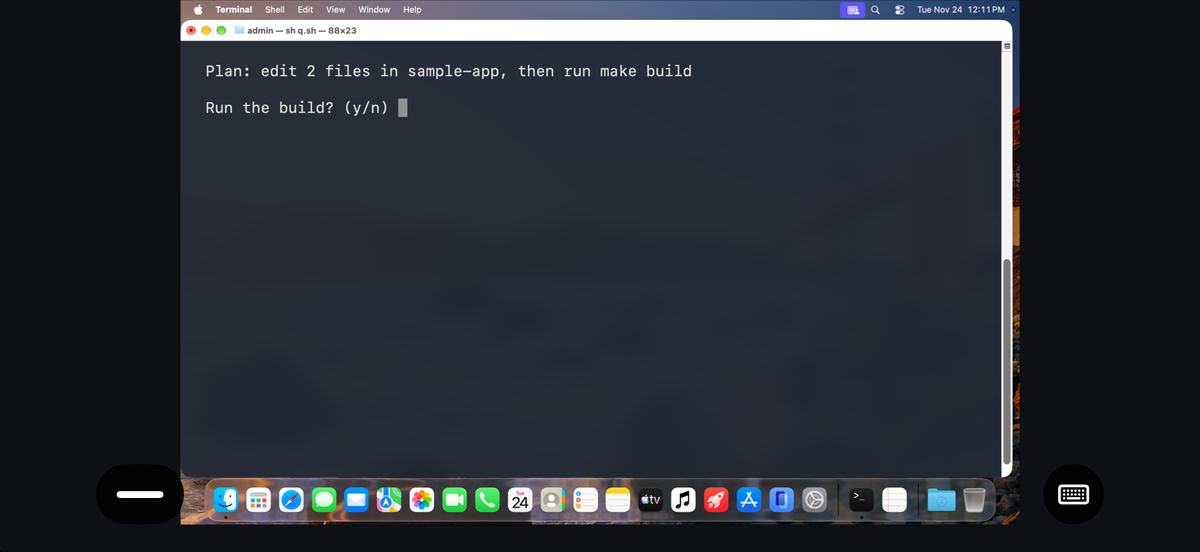
Answer a prompt
Coding agents often stop to ask before running a command or changing a file. To answer:
- Tap the terminal window to click it, so it is in front on the Mac.
- Open the on-screen keyboard with the keyboard button of the session.
- Type your answer and press Return, as you would at the Mac.
The bar of extra keys above the on-screen keyboard has the keys a terminal needs: Escape, Tab, the arrows, function keys and the modifier keys, including Control. On iPad, a hardware keyboard works too, and Mac keyboard shortcuts go to the Mac. DualMac also has on-device dictation: the text stays editable on your iPhone and is typed on the Mac only after you tap Send.
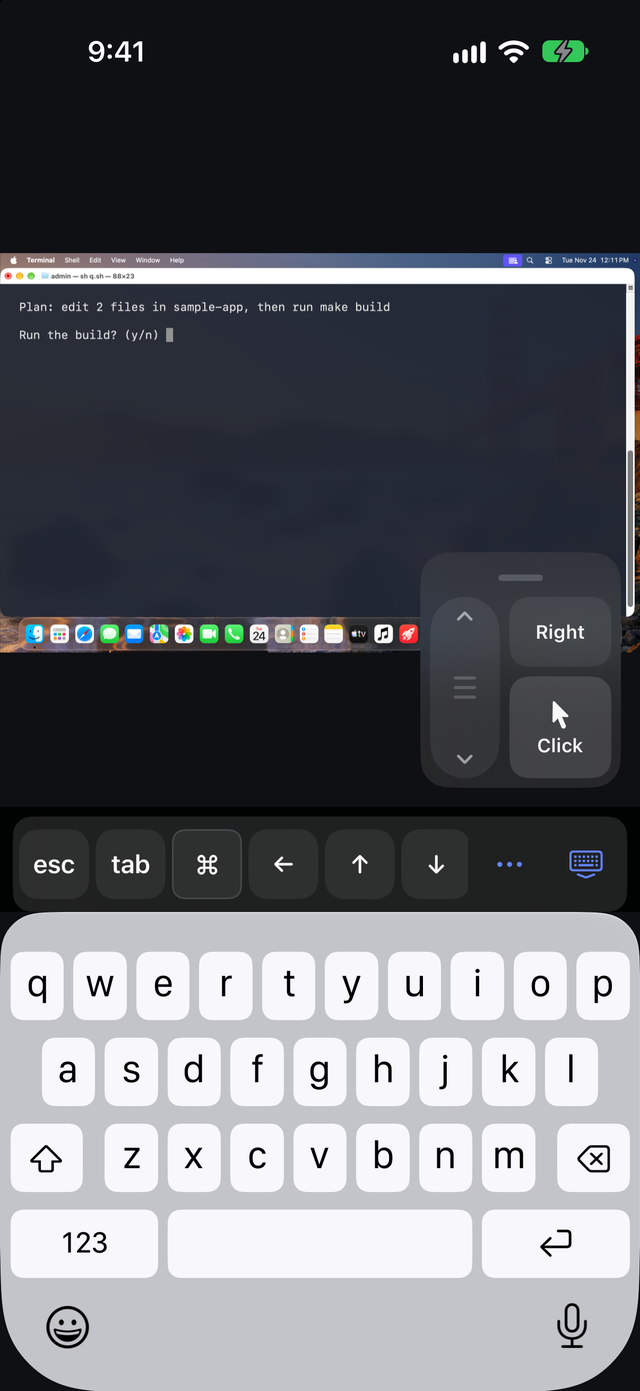
What DualMac does and doesn't do here
- DualMac shows and controls the Mac's screen. It doesn't read the terminal, doesn't talk to the agent and has no link with Claude Code, Codex or any other tool.
- It doesn't notify you when the agent needs you. You open the Mac in DualMac and look.
- The screen goes between your iPhone and your Mac over your Wi‑Fi or your tailnet, never through a DualMac server.
- DualMac shows and connects to one Mac at a time. Each Mac in your library opens in one tap.
DualMac is not affiliated with or endorsed by Anthropic, OpenAI or the maker of any other coding agent.
Let a coding agent set up the Mac
If you would rather not set things up by hand, DualMac can hand the setup to a coding agent on the Mac. In DualMac, tap + to open Add a Mac. The row Let a coding agent set it up reads “Paste this prompt in Claude Code or Codex on the Mac.” Its button copies this prompt:
Set up DualMac on this Mac for me. Fetch https://dualmac.app/agent.md
    with curl, read it in full and follow it.
Paste it in Claude Code or Codex on the Mac, for example by sending it to yourself. The agent then follows the public instructions at dualmac.app/agent.md: it checks Tailscale on the Mac and on your iPhone or iPad, and installs the free DualMac Companion from dualmac.app after checking its checksum and Apple signature. It leaves you only what macOS and your accounts keep for you: signing in to Tailscale, switching on two macOS permissions, and pairing your device with a code shown on the Mac. The instructions tell the agent never to ask for or type a password, never to use administrator rights without your agreement, and never to open a port to the internet.
Questions
Does DualMac work with Claude Code and Codex?
It works with any app on your Mac, because it shows the Mac's screen. There is no integration with Claude Code, Codex or their makers.
Will DualMac tell me when the agent is waiting for me?
No. DualMac sends no notifications about what runs on the Mac: you open the Mac in DualMac to check.
Can I answer from outside my home?
Yes, over Tailscale: sign in to the same tailnet on the iPhone and the Mac, then add the Mac with its Tailscale address. Never open port 5900 to the internet.
Does the agent keep running while the Mac is locked?
Yes, as long as the Mac stays awake. Type your macOS password in DualMac to unlock the screen and see the terminal.
Does my code go through a DualMac server?
No. The screen goes between your device and your Mac over your own network or tailnet, never through a DualMac server.
Sources
- Apple Support, Set sleep and wake settings for your Mac, Mac User Guide. Checked on November 24, 2026.