Control a headless Mac mini from your iPad or iPhone
Last updated: November 24, 2026 · By Jérémie Aouate
Short answer
A Mac mini with no display, keyboard or mouse can be controlled from an iPad or iPhone with DualMac, through the Screen Sharing built into macOS. Turn on Screen Sharing once, keep the Mac mini from sleeping, and connect over your Wi‑Fi or Tailscale. Plan for restarts: with FileVault on, the Mac waits for its password before macOS starts.
Before you unplug the display
Do these steps once, with a display, keyboard and mouse connected to the Mac mini, for example right after its first setup.
- Turn on Screen Sharing in System Settings › General › Sharing, and check that your account is allowed to connect. The steps are in Turn on Screen Sharing on your Mac and connect from iPad.
- Note the Mac's local hostname, shown at the bottom of the Sharing
pane and ending in
.local. - To reach it from outside your home, install Tailscale on the Mac mini and sign in: see Use your Mac from your iPad or iPhone over Tailscale.
- Set the sleep options below.
- Connect once from DualMac while the display is still plugged in, to check that everything works.
Keep the Mac mini awake
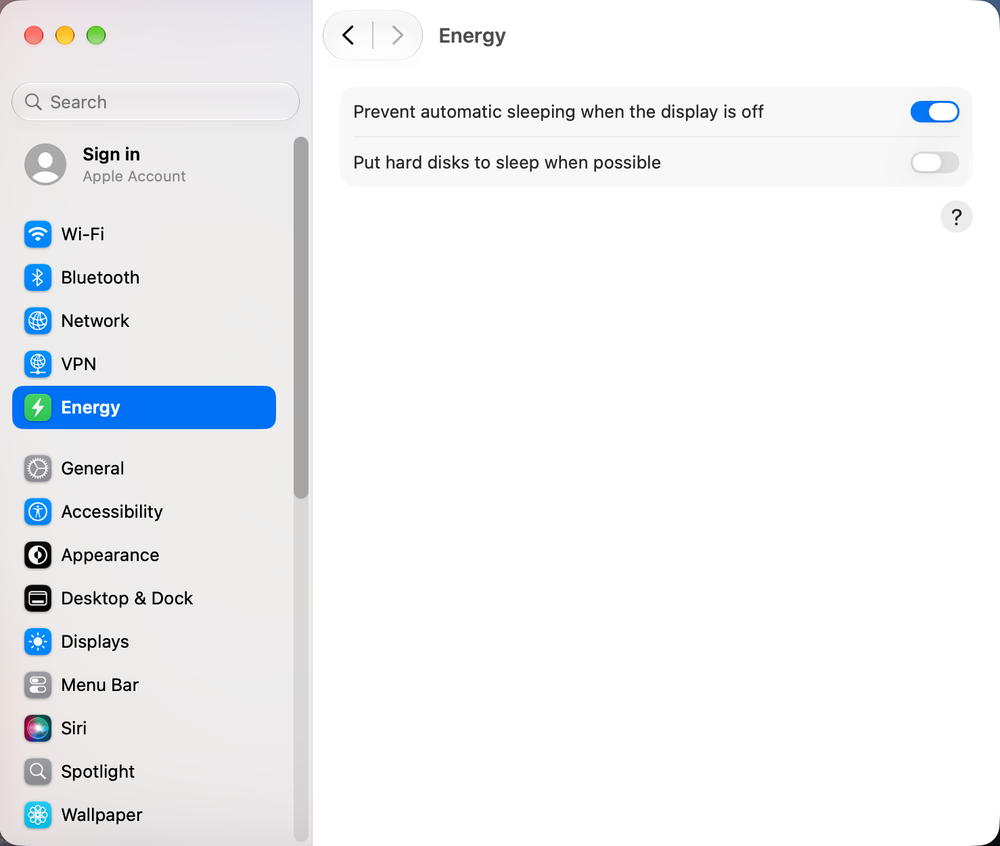
Screen Sharing can't answer while the Mac is asleep: DualMac then finds nothing to connect to. On a Mac mini, open System Settings › Energy:
- Turn on Prevent automatic sleeping when the display is off. This keeps the Mac awake even though no display is lit.
- Turn on Wake for network access, which lets the Mac wake briefly so others can reach its shared services.
- Set the Mac to start up after a power failure. Depending on the model, the option reads Start up automatically after a power failure or Start up when power is connected. On macOS 26.5 or later, a Mac mini introduced in 2024 or later can also turn on whenever it is connected to power.
Apple notes that preventing sleep can increase power use. What a locked or sleeping Mac can still do is in Can I connect to my Mac when it is locked, asleep or turned off?
What you see without a display
Without a display connected, macOS keeps running, and Screen Sharing shows the desktop macOS draws for it. macOS chooses the size of that desktop, not DualMac. DualMac shows it as the Mac sends it:
- Pinch to zoom in on small text, and drag to move the zoomed view.
- Drag with two fingers to scroll; tap with two fingers to right-click.
- On iPad, a hardware keyboard, trackpad or mouse works too, and Mac keyboard shortcuts go to the Mac.
After a restart
What you can do after a restart depends on FileVault and on how the Mac mini joins your network.
Without FileVault: the login window
After a restart, the Mac shows the login window. Screen Sharing works there: connect with DualMac, then type your macOS password with the keyboard, as you would at the Mac. If you prefer the Mac to reach the desktop by itself, choose your account in System Settings › Users & Groups › Automatically log in as. Anyone who restarts the Mac then gets your session, and this option isn't available while FileVault is on.
With FileVault: unlock first
With FileVault on, the Mac asks for a user's password during startup, before macOS has fully started, and Screen Sharing can't answer yet. Someone has to type the password at the Mac, unless you use Apple's SSH unlock: on a Mac with Apple silicon and macOS 26 or later, FileVault can be unlocked over SSH after a restart if Remote Login is on and the Mac has a network connection. Do this from an SSH app on another device on the same network. Once macOS has started, connect with DualMac as usual.
Tailscale waits for a login
The Mac App Store and standalone versions of Tailscale don't run
before someone logs in. After a restart, the Mac mini isn't on your
tailnet until a user has logged in, so from away you can't reach its
login window over Tailscale. On the same Wi‑Fi, DualMac still reaches it
by its local address. Tailscale's open source tailscaled
does run before login.
If the Mac mini doesn't answer
- It is asleep: check the Energy settings above. A sleeping Mac doesn't answer Screen Sharing.
- It restarted with FileVault on: it is waiting for its password at startup.
- You are away and it restarted: Tailscale starts only after a login. Connect from the same Wi‑Fi first.
- Screen Sharing is off, or your account isn't allowed: see the Screen Sharing guide.
- Still stuck: write to [email protected] with your iPadOS or iOS and macOS versions.
A Mac mini that stays on is also handy for long jobs you check from your phone: see Follow a long task on your Mac from iPhone.
Questions
Can I set up a brand new Mac mini without a display?
This guide assumes Screen Sharing is already on. Turn it on once with a display, keyboard and mouse connected, then unplug them.
Who decides the screen size without a display?
macOS does. DualMac shows the desktop the Mac sends; pinch to zoom in on small text.
Why can't I connect after a restart?
With FileVault on, the Mac waits for its password at startup. From away, Tailscale also waits until someone logs in.
How do I keep the Mac mini from sleeping?
In System Settings › Energy, turn on Prevent automatic sleeping when the display is off.
Do I need to install anything on the Mac mini?
No. Screen Sharing is built into macOS. Tailscale is needed only to reach the Mac from another network.
Sources
- Apple Support, Change Energy settings on a Mac desktop computer, Mac User Guide. Checked on November 24, 2026.
- Apple Support, Set sleep and wake settings for your Mac, Mac User Guide. Checked on November 24, 2026.
- Apple Support, Turn on a Mac mini, Mac Studio, or iMac without pressing its power button. Checked on November 24, 2026.
- Apple Support, How to log in automatically to a Mac user account. Checked on November 24, 2026.
- Apple, Managing FileVault in macOS, Apple Platform Security. Checked on November 24, 2026.
- Apple, Volume encryption with FileVault in macOS, Apple Platform Security. Checked on November 24, 2026.
- Tailscale, Three ways to run Tailscale on macOS. Checked on November 24, 2026.